
Pulling skins out of Hellcase is usually pretty easy, but a lot of people get tripped up by Steam issues, wrong trade links, or security settings that end up blocking the whole thing. This guide walks you through how withdrawals actually work, what you need to have set up first, and how to fix the most common problems so you can get your CS2 skins over to Steam without the headache. If you still need to fund your account first, use the deposit guide and a verified Hellcase promo code.
How Hellcase Withdrawals Work

Hellcase doesn’t manually send items – all withdrawals are processed through Steam Trade Offers.
This means:
- You must have a fully functioning Steam account.
- Your Steam settings and security status determine whether withdrawals succeed.
- If an item is temporarily out of stock, Hellcase may offer alternatives or require you to wait.
Hellcase cannot bypass Steam’s trading rules, cooldowns, or mobile authenticator requirements.
Requirements Before You Withdraw
Before attempting a withdrawal, make sure your account meets all the prerequisites:
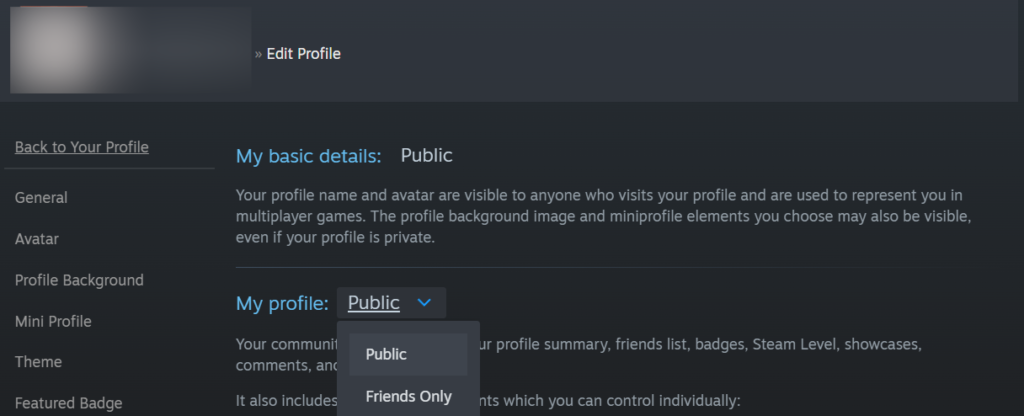
Steam inventory must be Public
Go to Steam → Inventory → Privacy Settings → set Inventory to Public.
Steam Guard Mobile Authenticator enabled for 15+ days
Newly activated authenticators cause trade restrictions.
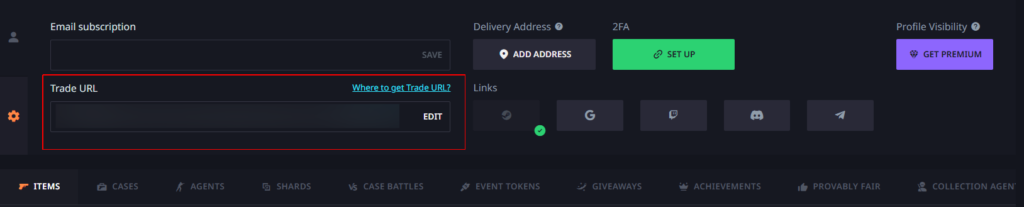
Correct Steam Trade URL
A single wrong character can block all withdrawals.
No Steam trade bans or temporary holds
Steam may block trading for password resets, region changes, suspicious activity, etc.
No VPN region mismatch
If your login region differs from your Steam region, trades may fail.
If any of these requirements are missing, Hellcase won’t be able to send you a trade offer.
How to Withdraw Skins on Hellcase (Step-by-Step)
- Log in to Hellcase via Steam
- Navigate to Inventory → Withdraw
- Select the skin you want to transfer
- Click Withdraw
- Hellcase generates a trade offer using the official Steam bot
- Open your Steam client or mobile app
- Confirm the offer through Steam Guard
- Your skin appears in your Steam inventory
If the offer doesn’t show up within a few minutes, jump to the troubleshooting section below.
Withdrawing Balance (If Available)
Some users convert skins into on-site balance and later transfer value through partner services or external markets.
Important notes:
- Hellcase typically does not offer direct cash withdrawals.
- You can sell skins, withdraw them as items, or use third-party marketplaces.
- Regional restrictions may apply.
Common Hellcase Withdrawal Errors & Fixes

Error: “Trade URL Required / Invalid Trade URL”
This is the most common issue.
Fix:
- Go to Steam → Inventory → Trade Offers → “Who can send me offers?”
- Copy the official Trade URL
- Replace the URL inside your Hellcase settings
- Save changes and retry withdrawal
Avoid using shortened URLs or links from untrusted sites.
Error: “Item Out of Stock”
Sometimes the item you selected is unavailable.
Fix:
- Choose a similar item of equal value
- Wait for restock
- Sell the drop for balance instead
Hellcase typically offers a replacement option when this happens.
Error: “Your Inventory Is Private”
Steam blocks all trades for private inventories.
Fix:
Set your Inventory Privacy = Public, then refresh Hellcase.
Error: “Steam Guard Not Active”
Steam requires a 15-day active authenticator before trading.
Fix:
Enable Steam Guard Mobile Authenticator and wait out the cooldown.
Error: Trade Offer Didn’t Arrive
Caused by Steam delays, account restrictions, or region issues.
Fixes:
- Check Steam’s trade history
- Restart Steam client
- Disable VPN
- Log out and back into Hellcase
- Check Steam server status (they often go down during updates)
Why Hellcase Might Temporarily Restrict Withdrawals
Hellcase may lock or delay withdrawals if:
- Suspicious activity is detected
- Multiple accounts are linked to the same device
- Promo codes are heavily abused
- You recently changed your Steam password
- You triggered automated anti-fraud filters
Restrictions usually lift automatically once the underlying issue is resolved.
How Long Do Hellcase Withdrawals Take?
In most cases: instant to a few minutes.
Delays happen due to:
- High traffic on Hellcase
- Steam API downtime
- Trade holds after password or device changes
- Out-of-stock items
If more than 24 hours pass without progress, contact Hellcase support.
Tips for Smooth Withdrawals
- Keep your trade URL updated
- Always use Steam Guard mobile app
- Avoid switching between multiple VPN regions
- Watch Steam server status during large updates
- Withdraw earlier in the day when traffic is lower
The smoother your Steam account setup, the fewer problems you will encounter.
Conclusion
Hellcase withdrawals are simple once your Steam account is properly configured. Most problems come from trade URL mistakes, privacy settings, or Steam Guard restrictions – not the platform itself. Follow the steps in this guide, keep your security settings updated, and you’ll be able to withdraw skins smoothly and reliably.
Related Guides
- Deposit guide — how funds get onto Hellcase
- Promo codes — start with free balance before withdrawing
- Is Hellcase legit? — trust and withdrawal reliability
- Payment methods — how deposits relate to withdrawals
FAQ
Can I withdraw skins directly to Steam?
Yes – Hellcase uses official Steam trade offers.
Why is my withdrawal pending?
Usually due to Steam holds, missing requirements, or temporary stock issues.
Can I withdraw money instead of skins?
Direct cashouts are generally not available. Most users withdraw skins and sell them elsewhere.
Why did my trade get cancelled?
Most commonly: expired offer, wrong URL, private inventory, or Steam Guard issues.
Do promo-code items withdraw normally?
Yes – as long as the item is tradable and your Steam account meets all requirements.